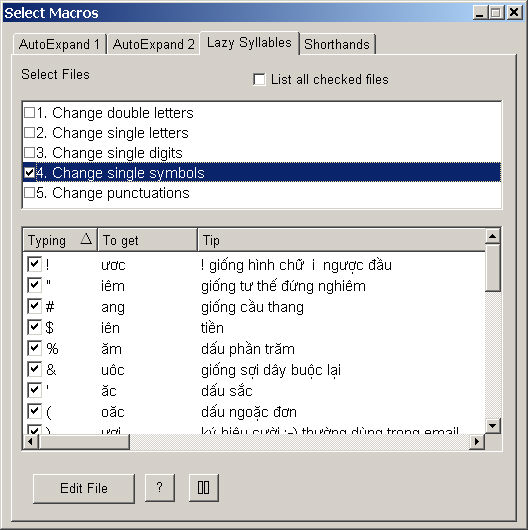
Lazy syllable macros, or lazy macros for short, are a special type of macros that work only when they appear after Vietnamese consonants that begin a new word. Lazy syllables are smart in the sense that the expansion occurs if and only if the resulting word is Vietnamese. Lazy macros are invented by the author based on observations on Vietnamese syllables and keyboard layouts.
For instance, suppose macro "#" represents syllable "ang". This macro will expand into "ang" only when typed after a Vietnamese consonant, such as: b# ==> bang.
Note typing z# does not expand into zang because consonant z is not Vietnamese. However, WinVNKey allows you to treat consonant z (and other foreign consonants like f, j, w) as Vietnamese so that typing z# will give you zang. You can do this from the main page by clicking on Viet Option Page ==> Viet Word Processing.
WinVNKey predefines five tables of Lazy Syllable macros as follows:
1. Change double letters
2. Change single letters
3. Change single digits
4. Change single symbols
5. Change punctuations
Macros in each table can be turned on/off individually as shown above. However, you should not enable all the tables at the same time. In particular, never enable tables 1 and 2 at the same time because the shorter macros in table 2 will override the longer macros in table 1. You can add/delete/change these macros or create new tables. When you define a new macro, find an appropriate table or create a new one to put it in. Each table has some common characteristics to help you remember easily.

This table contains digits only. Even though digits represent accent marks in VNI typing method, they are never used after consonants that start a Vietnamese word. Thus they can be used to represent Vietnamese syllables. In general, these macros are fast on US keyboards because users do not need to press a SHIFT key.
This table contains symbols like ' ` ? ~ @ # $ % etc because they never follow Vietnamese consonants that begin a word.
In fact, have you ever seen an acute accent mark follow a Vietnamese consonant like b? Thus if ' stands for syllable ăc, you can type b' and get băc, saving a few key presses.
Because symbols are usually suggestive of pictures or sounds, they are relatively easy to remember. Some symbols are very fast because they do not need a SHIFTkey. In addition, using symbols do not interfere with typing English or foreign words.
For example, suppose syllable macro "k" stands for "ông". Because it is a letter, using it can cause undesirable expansion when you really want to type a foreign word, say ski. Fortunately, this version of WinVNKey is very smart. If the "Uncombine" option is enabled in the "Viet Option" page, you can keep typing and WinVNKey will automatically fix it:
typing sk ==> getting sông
typing i ==> getting sôngi
But because sôngi is not a correct Vietnamese word, WinVNKey will undo the macro operation (ông ==> k) and you will get ski exactly as intended.
This table contain letters like b, c, k, q, ... that never follow a Vietnamese consonant. For example, if c stands for ươc, you can type bc' to get bước.
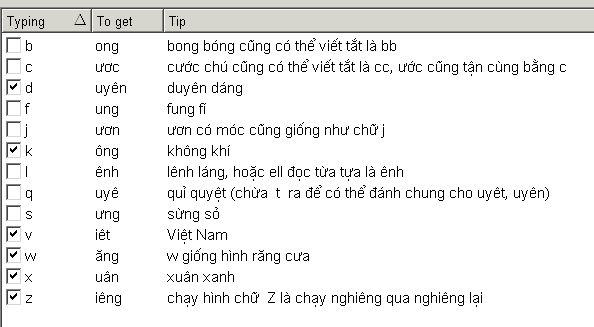
Using a single letter macro makes typing fast but difficult to remember. In general, avoid this table if you want to type both Vietnamese and foreign text at the same time because foreign words may legally contain these letters after consonants. For example, letters c, k, l never follow consonants for Vietnamese words but may follow for English words (such as scan, ski, blow, etc)
This table contains letter pairs that never follow a Vietnamese consonant such as bb, cc, dd, mt, nd, ... In general you can define a pair of arbitrary consonants except "gh" because it can follow "n", e.g. nghiêng. Therefore, this table can potentially contain hundreds of macros.
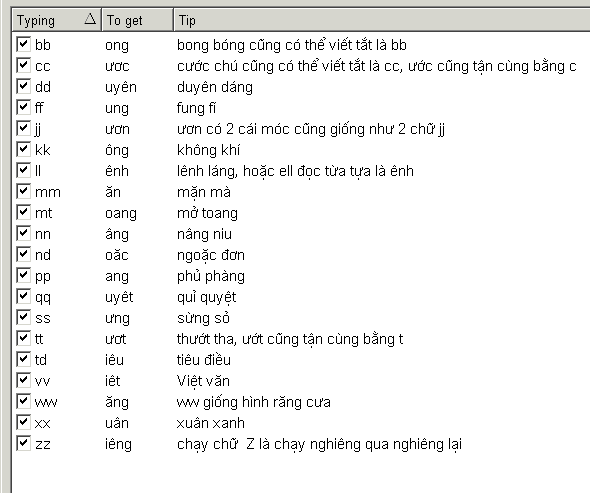
But the main challenge is to come up with a way to remember these macros easily so that you can use them effectively to speed up typing. WinVNKey has predefined a number of letter pairs along with tips to remember. For example, if dd stands for "uyên" (tip: both d's are the initials of duyên dáng), you can type "tdd" to get "tuyên". You can certainly have your own preferences. If you do not like the WinVNKey way, just modify to suit your need and send us a copy to share your tips.
In general, if well defined, these macros are easy to remember and can save you many keystrokes if they stand for syllables that require typing three or more keys. In the said example typing dd is faster than uyên not only because uyên requires 5 keys but also because repeating the same key is always faster than moving your fingers around to type two different letters.
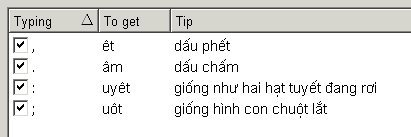
This table contains punctuations like period, comma, semicolon, colon, etc because they usually do not appear after single-letter words. For example, if : stands for uyêt (: looks like two falling snow drops), you can type "ng:" to get "nguyêt". In general, this table should be avoided to avoid interference with true punctuation marks. However, if knowing in advance your text does not contain single-letter words, you can enable this table to speed up typing significantly.
Again, if you don't want a macro to expand, just press and release a CTRL key or type an escape char (the backslash by default) before typing the last character of the macro names.